
How I Got an Old WordPress Running on Modern PHP — And Made It Faster Than New Versions
When I started rebuilding my site, I didn’t begin with the latest WordPress release, a shiny new theme, or a fresh list of “expert-recommended” plugins. The new versions are too heavy and does not provide protection against large companies. Yes you hear wright, Large Companies.
My starting point was much simpler: an old WordPress version 6.0.1, an old cool news theme (SuperNews), and a server already running modern PHP 8.3 to bulid The fastest blog website in the World.
It wasn’t ideal. It wasn’t recommended. It wasn’t “best practice”.
But it was mine — and I wanted to see whether I could turn it into something fast, stable, safe from intruders and stalkersa and genuinely usable.
Why I Even Tried This
I had three very simple goals:
- a faster site, without waiting
- stability, without hidden background processes
- less dependency on plugins that decide what happens behind the scenes
And because I already understood how WordPress behaves under the hood, I decided to try something most people wouldn’t: run an old WordPress version on modern PHP and optimize it manually.
What Happens When You Run Old WordPress on Modern PHP
Surprisingly little breaks.
Sure — some functions needed adjustments, a few files needed cleaning, and some scripts had to go.
But the WordPress core is more robust than most people think.
The real issues weren’t compatibility. The real issues were the things WordPress does in the background:
- checking for updates
- calling WP.org
- writing transients
- checking themes
- checking plugins
- running cron
- running health checks
- verifying file integrity
And it does all this even when you don’t need it.
What I Did Differently
Instead of adding more plugins, I did the opposite:
- blocked WP.org API
- blocked update mechanisms
- disabled cron entirely
- removed unnecessary theme scripts
- removed Google API calls
- removed TGM plugin activation hooks
- removed companion plugins
- kept only admin-ajax, because it’s required for media and editing
And yes — I do use custom plugins.
But they are my own lightweight plugins, with no external APIs, no bloat, and no unnecessary features.
This wasn’t “optimization by the book”.
It was optimization by common sense.
What Happened After Optimization when the website goes live
The results were better than I expected.
Mobile
- Performance: 97
- Speed Index: 1.9 s
- LCP: 2.3 s
- SEO: 92
- Best Practices: 96
- Accessibility: 81
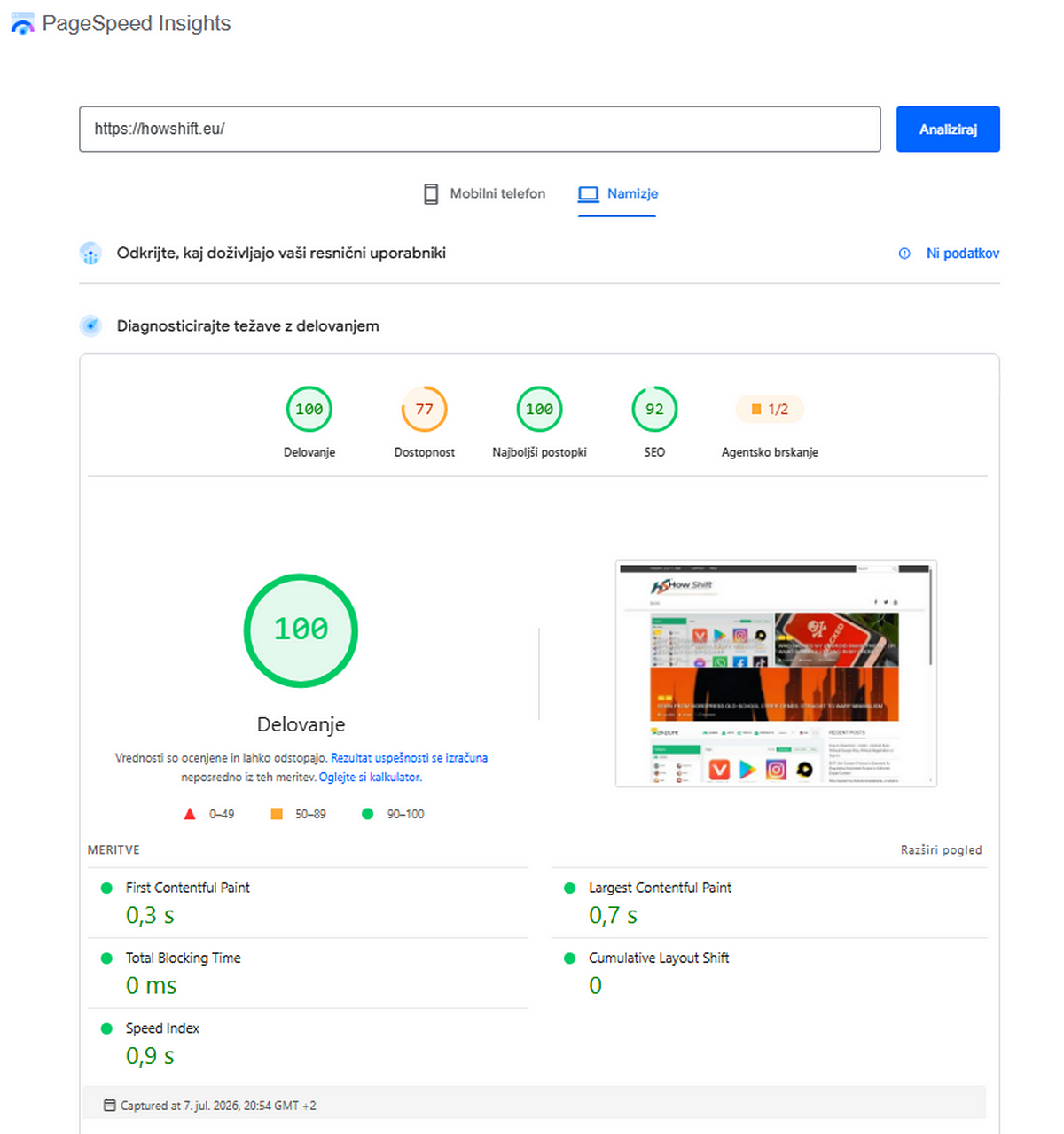
Desktop
- Performance: 100
- Speed Index: 0,9 s
- LCP: 0,7 s
- Best Practices: 100
- SEO: 92
- Accessibility: 77
These are numbers I usually see on:
- static HTML sites
- headless WordPress setups
- Next.js SSR builds
- ultra-light custom themes
Not on old WordPress + old theme + modern PHP. And This is just the beginning of the journey.
What I and We Learned
- WordPress isn’t slow — the background processes are slow.
- Old themes aren’t bad — the scripts they load are.
- Old WordPress versions aren’t unsafe — unnecessary entry points are.
- Plugins aren’t the problem — plugins with external APIs are.
- Modern PHP isn’t a barrier — WordPress doing too much is.
And most importantly:
manual optimization is still the best optimization.
Where This Leads
This article is just the beginning. Just the story. Just the experience.
If you want the technical details, code examples, .htaccess rules, and explanations of every block and tweak, the next article goes deep into the technical side.
If you want the performance story — how I got WordPress down to 1.2 seconds without heavy plugins — the next teaser article covers that.
This article is based on my original research and processing published in August 2026.



I am often to blogging and i really appreciate your content. The article has really peaks my interest. I am going to bookmark your site and keep checking for new information.
This is a very good tips especially to those new to blogosphere, brief and accurate information… Thanks for sharing this one. A must read article.